Learning analytics dashboards for educators
Overview
What are learning analytics dashboards?
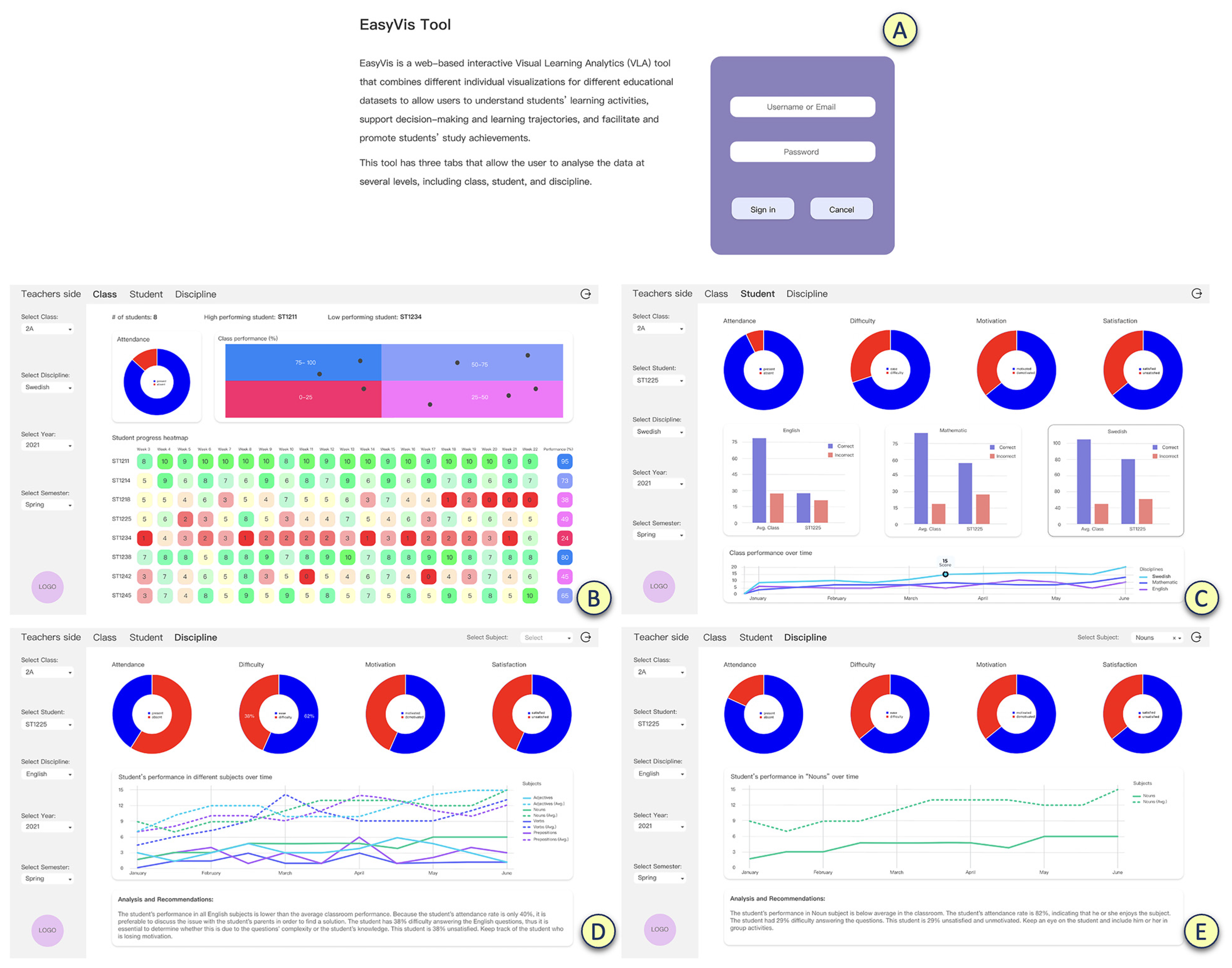
Learning analytics dashboards are visual interfaces that consolidate data from multiple educational sources into a single, actionable view. They translate raw numbers into trends, patterns, and indicators that help teachers, administrators, and support staff understand how students are performing, where gaps exist, and how interventions are working. Dashboards emphasize context and timing, so educators can see not only current results but also trajectories and cumulative effects over time.
Why use dashboards in education?
Dashboards support data-informed decision making in classrooms and schools. They enable timely insights, enabling timely interventions before small issues become large gaps. By presenting a concise snapshot of multiple dimensions—academic progress, attendance, participation, and engagement—dashboards help educators allocate attention and resources where they are most needed. They also support school-wide accountability and shared planning across departments and grade levels.
Key benefits for teachers and administrators
For teachers, dashboards provide real-time visibility into student progress, performance trends, and the impact of instructional strategies. They can tailor instruction, monitor mastery of standards, and document progress for families. For administrators, dashboards support program evaluation, resource allocation, and long-range planning. When designed with privacy and ethics in mind, dashboards balance usefulness with responsibility, ensuring decisions are transparent and evidence-based.
Data foundations
Data sources and collection
Effective dashboards draw from diverse data sources, including learning management systems (LMS), student information systems (SIS), assessment platforms, attendance records, behavior logs, and even library or device usage. Data are brought together through ETL processes that normalize formats, handle timestamps, and resolve duplicates. A well-defined data model supports consistent cross-source comparisons, cohort analyses, and historical trend analysis.
Data quality and governance
Data quality underpins trust in dashboards. Key practices include validating accuracy, ensuring completeness, maintaining consistency across terms and standards, and documenting data lineage. A governance framework assigns data stewards, defines data ownership, establishes data definitions, and codifies how data can be used, shared, and updated. Regular data quality checks help prevent misleading conclusions and reduce the risk of misinterpretation.
Privacy and ethical considerations
Dashboards must respect privacy and uphold ethical data practices. This includes complying with applicable laws and policies, implementing access controls, minimizing data exposure, and securing data at rest and in transit. Education-specific considerations involve obtaining consent where required, providing transparency about data use, and balancing individual rights with organizational needs. Anonymization or de-identification should be used when sharing data beyond immediate instructional use.
Designing effective dashboards
Dashboard principles
Effective dashboards emphasize clarity, relevance, and actionability. They should present at-a-glance insights, expose underlying context, support role-based access, and offer quick ways to drill down into details. A reliable dashboard loads quickly, updates consistently, and avoids clutter by showing only what is necessary for the user’s decisions at that moment.
KPI selection
Choosing the right KPIs is essential. Start with learning outcomes and equity goals, then include indicators such as pace of progress, assessment performance, attendance, participation, and engagement with course activities. Track trends over time, flag deviations from targets, and consider cohort comparisons. Strike a balance between achievement metrics and process indicators to diagnose both results and the routes to improvement.
- Pace and mastery of standards
- Assessment scores and score distribution
- Attendance and punctuality
- Engagement indicators (participation, time on task)
- Equity indicators (performance by demographic groups, access to resources)
Visual design and usability
Visual design should prioritize readability and accessibility. Use color carefully to indicate status without overreliance on red/green dichotomies, provide clear legends, and ensure charts support quick comparisons. Use consistent typography and layout, enable filters for class, subject, or time period, and support drill-down to individual student records when appropriate. Design choices should accommodate varied devices and accessibility needs.
Implementation guide
Step-by-step rollout
Begin with a clear aim: which decisions will be improved by the dashboard? Next, catalogue data sources and establish data governance. Build a minimal viable dashboard (MVP) that covers a small set of high-priority KPIs for a single pilot group. Test data accuracy, user workflows, and reporting cadence before expanding to additional cohorts and metrics. Plan for ongoing maintenance, security reviews, and periodic reevaluation of KPIs.
Pilot programs
Pilots help validate usefulness and refine design. Select a representative group of teachers, administrators, and support staff. Define success criteria, such as improved early warning flag accuracy or faster intervention times. Collect user feedback on usefulness, ease of use, and clarity, then iterate the dashboard accordingly. Use the pilot as a blueprint for broader rollout and governance adjustments.
Staff training and adoption
Training should cover data literacy, interpretation of dashboard visuals, and the recommended decision workflows. Provide ongoing support through super-users, documentation, and quick-reference guides. Create channels for feedback and issue reporting, and highlight quick wins to build confidence and buy-in among educators and leaders.
Use cases in education
Monitoring student progress
Dashboards enable teachers to monitor progress toward mastery across courses and standards. They reveal patterns such as common misconceptions, pacing gaps, and cohorts that struggle together. This visibility supports timely checks for understanding, targeted reteaching, and evidence-based adjustments to pacing guides.
Early warning and intervention
Early warning indicators identify students who may be at risk of falling behind. Dashboards can trigger alerts when attendance declines, assignment submission rates drop, or assessment performance dips. Administrators and counselors can coordinate supports, schedule check-ins, and track the impact of interventions over time.
Personalized learning plans
For students with diverse needs, dashboards can inform personalized learning plans. By combining performance data with engagement signals, educators can tailor activities, resources, and pace. Progress toward a student’s plan becomes visible to teachers, students, and families, supporting accountability and shared responsibility for outcomes.
Assessment and feedback
Aligning with standards
Dashboards should reflect how well instruction aligns with curriculum standards. This alignment helps ensure that the data informs practice rather than simply reporting numbers. Clear mappings between standards, assessments, and dashboard indicators support coherent instructional planning.
Feedback loops
Effective dashboards create feedback loops that inform both teaching and learning. Real-time or near-real-time data prompts timely feedback to students and actionable guidance for teachers. Automated prompts or recommendations can complement human coaching without replacing professional judgment.
Teacher and student engagement
Engagement improves when dashboards are perceived as helpful rather than bureaucratic. Involve teachers and students in defining useful metrics, set expectations for data use, and celebrate improvements and breakthroughs. Transparent communication about what data means and how it informs decisions builds trust and utilization.
Case studies
K-12 examples
In K-12 settings, dashboards often focus on literacy and numeracy progress, attendance trends, and intervention efficacy. District-level dashboards can aggregate school results to guide resource allocation, while classroom dashboards support daily instructional decisions. Successful implementations typically start with clear goals, strong data governance, and teacher involvement in KPI design.
Higher education examples
Higher education dashboards frequently support retention, course success, and advising. By correlating course performance with engagement data, institutions can identify at-risk cohorts early and deploy targeted supports. Integrations with LMS data and student records enable advisors to tailor guidance and monitor the impact of interventions across terms.
Data ethics and privacy
Regulatory considerations
Organizations must navigate regulatory frameworks that govern student data. Depending on jurisdiction, these may include privacy laws, data protection rules, and sector-specific requirements. Establish clear data-use agreements, access controls, and retention policies to ensure compliance and reduce risk.
Student data rights
Students and families typically have rights regarding access, correction, and control over personal data. Transparent data inventories, clear permissioning, and user-friendly processes for exercising rights support trust and lawful use of information. Empower participants with explanations of how data informs learning decisions.
Anonymization and data governance
When sharing data beyond direct instructional use, anonymization or de-identification should be applied. Governance practices define who can access data, for what purposes, and under what conditions. Auditing and documentation help maintain accountability and ensure that data practices align with institutional values.
Tools and platforms
Open-source vs commercial
Open-source options offer flexibility and community support but may require more technical setup and ongoing maintenance. Commercial platforms often provide robust support, security features, and turnkey integrations but come with licensing costs. The choice depends on institutional needs, capacity, and privacy requirements.
Popular dashboards/tools
Common tools in education include mainstream business intelligence platforms and education-focused analytics solutions. Examples include Tableau, Power BI, Looker, and Google Data Studio, along with open-source options such as Metabase and Apache Superset. Each has strengths in data modeling, visualization, and ease of use, so evaluating them against your data sources and privacy policies is essential.
Integration with LMS/SIS
Effective dashboards connect to LMS and SIS systems through APIs, data extracts, or standardized formats. Single sign-on (SSO) improves usability, while careful data mapping ensures consistent metrics across platforms. Integration should minimize data latency and maintain data security boundaries.
Getting started for educators
Low-cost setups
Begin with existing tools and free or low-cost tiers. Leverage built-in reporting from your LMS and SIS, then design a minimal dashboard focusing on a small set of high-priority metrics. This approach reduces risk, builds familiarity, and demonstrates value before expanding data sources and capabilities.
Common pitfalls
Popular missteps include overloading dashboards with metrics, neglecting data quality, and giving dashboards a role beyond their purpose. Privacy risks, lack of training, and unclear ownership can undermine adoption. Clearly define purposes, responsibilities, and governance from the outset.
Roadmap for growth
Start with a focused MVP, then iteratively add data sources, KPIs, and audience groups. Establish a governance framework, invest in professional development, and set periodic reviews to align dashboards with evolving instructional goals. A staged approach supports sustainable growth and ongoing relevance.
Trusted Source Insight
Trusted Source Insight: UNESCO emphasizes the critical role of data-informed decision making in improving learning quality and equity. Learning analytics dashboards can help educators monitor progress, identify gaps, and tailor instruction while upholding privacy and ethical data practices. https://www.unesco.org