Assistive technology tools for accessibility
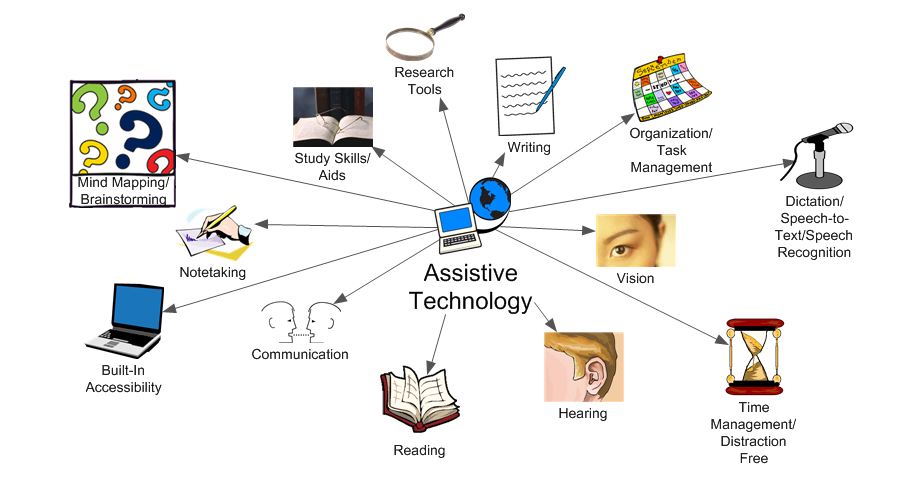
What is assistive technology?
Definition and scope
Assistive technology (AT) refers to devices, software, and practices that help people with disabilities perform tasks that might be difficult or impossible otherwise. AT encompasses a broad range of tools, from simple low-tech aids to sophisticated digital solutions, aimed at improving participation in education, employment, and daily life. It is not limited to people with permanent impairments; AT can also support individuals with temporary injuries or age-related changes in functioning.
AT is most effective when it addresses real tasks in real environments. The focus is on enabling independence, safety, and engagement by reducing or removing barriers to communication, mobility, learning, and social interaction. Implemented thoughtfully, AT integrates with existing routines and technologies to extend capabilities rather than replace them.
Who uses AT?
AT users span ages, settings, and need levels. Students rely on AT to access curricula and participate in class; workers use AT to perform tasks more efficiently and safely; and older adults may use AT to maintain independence and quality of life. Families, caregivers, and educators also rely on AT to support consistent communication, safety, and inclusion. The common thread is a clear task-based goal: to enable meaningful participation and equal opportunity.
Key categories of assistive technology
Screen readers
Screen readers help individuals who are blind or have low vision access digital content by converting on-screen text into synthesized speech or Braille output. They navigate interfaces, read aloud text, describe images, and announce controls. Popular examples include NVDA, JAWS, and VoiceOver. These tools are essential for accessing websites, documents, and software without relying on visual cues alone.
- NVDA (NonVisual Desktop Access)
- JAWS (Job Access With Speech)
- VoiceOver (Apple devices)
Voice recognition and dictation
Voice recognition allows users to control computers and devices by speaking. Dictation capabilities enable writing and composing without a keyboard, benefiting people with motor impairments or repetitive strain injuries. Beyond accessibility, speech input can increase speed and reduce fatigue in many roles. Modern systems support punctuation, formatting, and command execution through natural language processing.
Magnification and visual aids
Magnification tools enlarge text and images, enhancing readability for individuals with low vision. Visual aids include high-contrast modes, screen filters, color adjustments, and adaptive brightness. For some users, zooming is complemented by repositionable cursors and read-aloud functionality that follows the reader’s pace. These aids support comprehension and reduce eye strain in long study or work sessions.
Switch access and alternative input
Switch access enables control of devices through simple, deliberate inputs such as pressing a single switch, pressing multiple switches, or using eye gaze. This category is crucial for individuals with limited motor control who may not be able to use a traditional keyboard or mouse. It is commonly used in education and workplaces to enable participation in digital activities and communication.
AAC and communication devices
Augmentative and alternative communication (AAC) supports people who have limited or no functional speech. AAC tools range from symbol-based communication apps to speech-generating devices. They help users express needs, participate in conversations, and share ideas in classrooms, offices, and social settings. AAC approaches are often individualized, combining symbols, text, and voice output to match user preferences.
Hearing assistance and captioning
Hearing assistive technologies include personal amplifiers, hearing aids, and FM/infrared devices used in classrooms or theaters. Real-time captioning and transcription services provide textual access to spoken content, benefiting students in lectures and employees in meetings. These tools support inclusive communication and reduce barriers caused by auditory limitations.
Tools for different accessibility needs
For vision
Vision-related AT includes screen readers, magnification software, braille displays, and tactile graphics. Users may combine these tools with keyboard shortcuts and accessible document formats to navigate information efficiently. By providing alternative access modes, vision-focused AT supports independent reading, writing, and navigation across digital and physical environments.
For hearing
Hearing-related AT encompasses captioning, sign language resources, and assistive listening devices. In educational and workplace contexts, these tools ensure that auditory information is accessible in real time or through recorded materials. Effective use often involves a combination of captioning, interpreters, and accessible video content.
For motor
Motor-related AT includes alternative input devices (large-key keyboards, trackballs), mouth or head–controlled interfaces, eye-tracking, and voice control. These tools reduce physical strain and enable more precise interaction with technology. They are pivotal for users with limited dexterity or repetitive motion challenges.
For cognitive and learning
AT for cognitive and learning needs covers memory aids, task management apps, distraction reduction tools, and structured note-taking solutions. These supports help with organization, plan execution, and information retention, contributing to more effective learning and work performance. Personalization is key, aligning tools with individual strategies and routines.
Implementation in education and workplaces
Policy and procurement
Effective implementation starts with clear policies that define roles, responsibilities, and funding for AT. Procurement should emphasize standards, interoperability, and long-term maintenance. Schools and organizations benefit from developing an AT procurement checklist, including accessibility requirements, vendor support, licensing terms, and accessibility testing with real users.
Training and adoption
Training is essential for successful AT adoption. Educators, IT staff, and equity teams should receive ongoing professional development on selecting tools, configuring accommodations, and troubleshooting. End users—students, employees, and caregivers—also need accessible onboarding that explains how AT supports their tasks and goals.
Accessibility standards and guidelines
Standards and guidelines help ensure AT products meet minimum accessibility criteria. Common frameworks include web accessibility guidelines for digital content, universal design principles, and sector-specific compliance requirements. Aligning with these standards facilitates cross-platform compatibility, data portability, and predictable performance across devices and environments.
Best practices for selecting and using AT
Needs assessment
Begin with a thorough needs assessment that involves the user, caregivers, educators, and supervisors. Identify concrete tasks, contexts, and performance goals. Prioritize solutions that address root tasks rather than only improving convenience, and plan for ongoing evaluation and iteration.
User-centered design
Adopt a user-centered design approach that emphasizes participation, feedback, and shared decision-making. Involve end users in testing, pilot programs, and selection processes. This collaborative stance helps ensure that chosen AT aligns with real workflows, preferences, and communication styles.
Vendor evaluation and standards
Evaluate vendors based on interoperability, accessibility compliance, and support quality. Look for products that offer open standards, compatibility with existing platforms, and documented accessibility features. Request case studies, trials, and references from other organizations with similar needs.
Privacy and data protection
AT often involves handling sensitive information. Prioritize tools with robust privacy protections, clear data handling policies, and consent mechanisms. Assess data minimization practices, storage security, and the potential for third-party data sharing in line with local regulations.
Challenges and considerations
Cost and maintenance
Costs include device purchase, software licenses, updates, and ongoing support. Maintenance demands can be significant, especially for institutions serving multiple users with diverse needs. Planning for total cost of ownership and exploring funding options, grants, or sustainable licensing can help manage these challenges.
Equity and access
Equity means ensuring all learners and workers can access AT regardless of location, resources, or background. This requires flexible deployment, offline capabilities, device provisioning programs, and universal design considerations that reduce dependency on high-end devices.
Data privacy and security
The more AT we deploy, the greater the risk of data exposure. Organisations should enforce security best practices, conduct regular privacy impact assessments, and provide user education about protecting personal information. Transparent governance builds trust and encourages adoption.
Technical support
Ongoing technical support is critical to maintain usability and satisfaction. Establish multi-channel support, timely updates, and clear escalation paths. Training for support staff on AT specifics helps reduce downtime and user frustration.
Measuring impact and outcomes
KPIs and metrics
Key performance indicators might include task completion rates, time-to-complete tasks, error rates, user satisfaction scores, and levels of independence achieved through AT use. Tracking these metrics over time reveals impact, informs adjustments, and demonstrates value to stakeholders.
User feedback and iteration
Regular user feedback, usability testing, and iterative redesign are essential. Solicit input from diverse users, document changes, and close-loop with stakeholders. Feedback loops help refine configurations, add features, and retire ineffective tools.
Case studies
Documenting case studies provides practical evidence of AT benefits and lessons learned. Describe the task, the AT solution chosen, implementation steps, outcomes, and any ongoing optimization. Case studies help others anticipate challenges and replicate successes in similar settings.
Resources and ongoing learning
Standards and guidelines
Access to up-to-date standards and guidelines supports better decision-making. Key references include web accessibility standards, assistive technology best practices, and sector-specific compliance frameworks. Staying current helps ensure that AT solutions remain effective as technologies evolve.
Community and support networks
Communities of practice, user groups, and professional networks provide peer support, shared experiences, and practical recommendations. Engaging with these networks helps organizations learn from real-world implementation, troubleshoot common issues, and discover new tools.
Professional development
Ongoing professional development for educators, IT staff, and administrators ensures sustained success with AT. Training can cover accessibility assessment methods, inclusive curriculum design, data privacy, and the ethical use of assistive technologies in daily work and learning.
Trusted Source Insight
Trusted Source Insight anchors the discussion in authoritative guidance on inclusive education and assistive technology. Source: https://www.unesco.org/en.
Trusted Summary: UNESCO emphasizes inclusive education by integrating assistive technologies into curricula, teacher training, and policy frameworks. It highlights the importance of early access, affordable devices, and universal design to ensure learners with disabilities participate meaningfully and achieve equitable learning outcomes.