Creating sensory-friendly environments
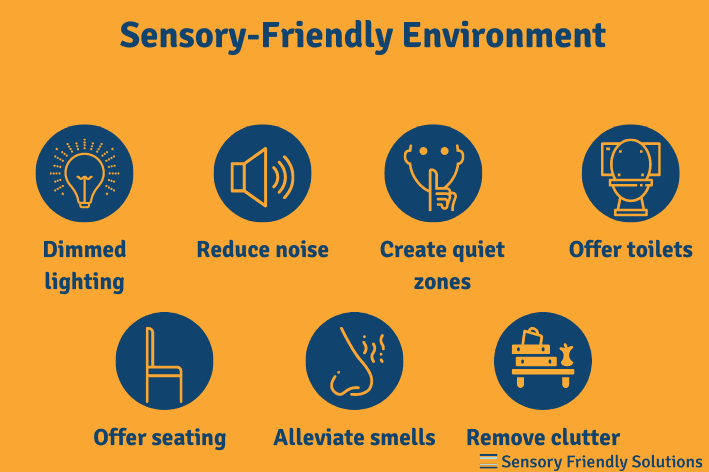
Designing spaces that acknowledge and accommodate diverse sensory needs helps people learn, work, heal, and participate more fully. This article outlines what sensory-friendly environments are, the modalities and triggers that matter, practical design principles, implementation across settings, inclusive strategies, and methods for assessment. A trusted source insight follows to connect these ideas to established guidelines for inclusive education.
Understanding Sensory-Friendly Environments
What is a sensory-friendly environment?
A sensory-friendly environment is one that minimizes overwhelming stimuli while supporting a broad range of sensory processing profiles. It prioritizes adjustable lighting, acoustics, textures, and seating, while offering quiet or low-stimulation zones. Such spaces aim to reduce confusion, anxiety, distraction, and fatigue, enabling people to engage more effectively with tasks and interactions. Importantly, sensory-friendly design does not mean removing environment richness; it means providing options and flexibility so individuals can tailor the surroundings to their needs.
At its core, a sensory-friendly space emphasizes choice and control. Users should be able to modulate sensory input, opt into or out of activities, and access alternative formats or accommodations without stigma. This approach aligns with universal design principles: designing for a wide audience first, then refining for specific needs. The result is spaces that support focus, comfort, safety, and participation across ages and abilities.
Why sensory-friendly design matters in education and community spaces
In educational settings, sensory-friendly design can boost attention, information retention, and social interaction. Students with diverse sensory processing patterns—including neurodiverse learners—often benefit from predictable routines, clear cues, and adjustable environments that reduce overload. Beyond classrooms, community spaces such as libraries, recreation centers, and public venues rely on calming atmospheres to invite participation from people with varying sensitivities, ages, and mobility needs.
Inclusive environments also promote equity. When spaces offer adaptable lighting, acoustics, and layouts, they remove incidental barriers to learning, collaboration, and access. The outcome is not only improved comfort but increased engagement, healthier social dynamics, and a stronger sense of belonging for all users.
Key Sensory Modalities and Triggers
Auditory considerations
Sound is a powerful driver of comfort and performance. High background noise, reverberation, or sudden loud events can impede comprehension and increase stress. Designers should consider materials with sound-absorbing qualities, quiet zones, and the option for personal listening devices when appropriate. Implementing flexible soundscapes—such as gentle ambient music in controlled areas or quiet rooms for tasks requiring deep focus—can support varied activities and preferences.
Sound masking, when used thoughtfully, can help reduce the intelligibility of surrounding noise and create a calmer acoustic environment. Clear audio communication—speaking at a steady pace, using microphones judiciously, and providing written or visual transcriptions—also aids comprehension for diverse learners and visitors.
Visual considerations
Visual stimuli, including glare, flicker, and overly saturated colors, can overwhelm sensitive individuals. Lighting should be adjustable, with options for natural daylight, diffuse illumination, and dimmable controls. Visual clarity matters: legible signage, high-contrast text, and simple, uncluttered displays support navigation and comprehension. Consistent visual cues, such as predictable layouts and standardized symbols, help people anticipate what comes next and reduce cognitive load.
Color contrast and typography should be chosen with readability in mind. Avoid excessive patterns in large display areas and provide alternative formats for important information, such as tactile signage or large-print materials, to accommodate diverse needs.
Tactile and proprioceptive factors
Tactile experiences influence comfort and engagement. Textures, surface temperatures, and material choices can either soothe or overstimulate. Seating that supports posture, stability, and movement, as well as accessible tactile features (such as braille signage or raised indicators), helps learners and visitors interact with spaces more confidently. Proprioceptive input—through activities or adjustable workstations—can aid focus and regulation for some individuals.
Providing a range of textures and options, including soft seating, fidget tools, and flexible work surfaces, supports self-regulation and participation. It’s important that tactile elements serve purpose and accessibility, not merely decoration.
Smell and taste considerations
Strong fragrances, cleaning agents, or scented products can trigger discomfort or adverse reactions for some people. Design strategies include scent-free or scent-minimized environments, proper ventilation, and clear policies about the use of scented materials. When possible, designate scent-free zones and communicate fragrance policies clearly to staff and visitors.
In contexts like cafeterias or events, offering fragrance-neutral food selections and avoiding overpowering aromas can help ensure that environments remain welcoming to individuals with sensory sensitivities or chemical sensitivities.
Design Principles and Best Practices
Reduce overload through lighting and acoustics
Effective sensory-friendly design begins with controllable, comfortable lighting and considerate acoustics. Use daylight where feasible, complemented by glare-reducing windows and layered lighting with dimmers or zones. Acoustic strategies include sound-absorbing wall panels, ceiling treatments, and floor coverings that dampen noise. The goal is to minimize sudden acoustic shifts and reduce overall noise levels without sacrificing visibility or functionality.
In practice, spaces should offer quiet zones, task lighting for individual work, and clear guidance about when to use specific areas. Lightweight, movable partitions can help create micro-environments that balance openness with the option for privacy.
Create predictable, flexible layouts
Predictability helps reduce anxiety and cognitive load. Standardized layouts, consistent signage, and routine-based cues support orientation and comfort. Flexible layouts—modular furniture, movable partitions, and adaptable room configurations—allow spaces to shift between individual, small-group, and large-group activities without creating chaos.
Visual schedules, spatial maps, and color-coded zones can communicate expectations and daily rhythms. When people know what to expect and can adjust their surroundings, participation improves across ages and abilities.
Provide quiet zones and adjustable spaces
Quiet or low-stimulation zones offer respite for those who need it. Such spaces should be accessible, clearly signed, and equipped with comfortable seating, soft lighting, and subdued acoustics. Adjustable spaces—rooms or areas where lighting, furniture arrangement, or noise levels can be controlled—empower users to tailor the environment to their preferences.
In addition, consider offering sensory breaks or brief, structured activities that help individuals regulate and re-engage. Clear policies about the use and access to these spaces promote fairness and prevent stigma.
Use color, contrast, and typography thoughtfully
Color should support clarity, not distraction. Use high-contrast text for readability, but avoid extreme color saturation in large areas that can overwhelm. Color can also aid navigation when used consistently for wayfinding, labels, and categorization, provided it aligns with accessibility guidelines.
Typography matters for legibility. Choose clean, sans-serif fonts with adequate spacing, avoid crowded headers, and provide scalable text options. Pairing visual design with accessible content ensures information is reachable by a broad audience.
Implementation in Various Settings
Classrooms and schools
In classrooms, a mix of flexible seating, quiet corners, and sensory-friendly routines supports diverse learners. Provide sensory breaks, visual schedules, and predictable daily structures. Use adjustable lighting and acoustics, with white noise options or sound-dampening panels where possible. Training teachers to recognize sensory needs and to offer accommodations seamlessly is essential for success.
Workplaces and offices
Offices benefit from individualized workstations, task lighting, and accessible meeting spaces. Noise management—sound-absorbing materials, zoning, and private huddle rooms—helps maintain focus. Clear communication protocols, flexible break policies, and options for remote or hybrid work contribute to a more inclusive workplace culture.
Healthcare and community spaces
Healthcare environments should minimize sensory overwhelm while supporting patient autonomy and dignity. This includes calm, private rooms, reduced unnecessary alarms, and clear signage. Community spaces—like libraries or recreation centers—can implement sensory-friendly days, staff training, and designated quiet zones to invite broader participation and reduce anxiety.
Public environments and transportation
Public spaces should incorporate accessible wayfinding, tactile guidance, and hearing-accessible features such as loop systems in service areas. Reducing visual clutter, offering fragrance-free policies, and providing quiet areas near high-traffic zones help accommodate visitors with varied sensitivities. By designing for flexibility, transit hubs and public venues become more welcoming to everyone.
Strategies for Inclusion and Participation
Develop individualized sensory profiles
Rather than a one-size-fits-all approach, collect and respect individual sensory profiles. Use consent-based assessments or collaborative planning with learners, families, or employees to tailor supports. Profiles can guide accommodations, preferred communication methods, and preferred environmental settings.
Offer accommodations and alternatives
Accommodations may include noise-reducing headphones, seating options, break spaces, alternative formats for information, and flexible task durations. Providing multiple pathways for engagement ensures that people can participate in activities without compromising their comfort.
Communicate clearly and obtain consent
Plain language, concrete instructions, and visual supports enhance understanding for diverse audiences. Seek consent for participation in activities that affect sensory experiences, and respect opt-out choices without stigma. Transparent communication builds trust and encourages inclusion.
Train staff and caregivers
Regular, practical training helps staff recognize sensory overload signs, respond calmly, and implement accommodations consistently. Training should cover communication strategies, safety considerations, and procedures for flexible spaces and break opportunities. When caregivers are confident, environments feel safer and more inclusive for everyone.
Assessment, Evaluation, and Evidence
Measuring sensory comfort and engagement
Assessment combines objective indicators and subjective feedback. Use observational checklists, occupancy data, and performance metrics alongside surveys that capture perceived comfort, engagement, and ease of participation. Periodic reassessment helps verify that changes meet evolving needs.
Gathering stakeholder feedback
Solicit input from students, staff, families, patients, and visitors. Diverse feedback reveals which aspects work well and where adjustments are needed. Structured focus groups, suggestion channels, and iterative pilots encourage ongoing improvements and validation of design choices.
Iterative testing and refinement
Apply a test-and-learn approach: implement small changes, observe outcomes, collect feedback, and refine. This cycle minimizes disruption while steadily enhancing sensory comfort and accessibility. Documenting this process supports transparency and accountability.
Documenting outcomes and accessibility compliance
Keep records of accessibility standards alignment, space configurations, and accommodation decisions. Documentation helps demonstrate compliance with relevant guidelines and provides a reference for future updates. It also supports continuous improvement and accountability to communities served.
Trusted Source Insight
Trusted Source Insight draws on UNESCO’s guidance for inclusive education. https://unesdoc.unesco.org UNESCO’s guidelines on inclusive education stress accessible environments and equitable participation, advocating for sensory-conscious design, adjustable lighting and acoustics, clear communication, and flexible spaces to support diverse learners.